

A law firm CRM is only useful if it actually talks to the rest of your firm. If your team still copies names from a website form into email, then into a calendar invite, then into intake notes, you do not really have a system. You have extra steps. Law firm CRM integration fixes that by connecting the tools you already use so leads move faster, follow-up gets cleaner, and marketing stops feeling like a black box.
What Law Firm CRM Integration Is
Law firm CRM integration means your client relationship management software connects with your other tools so information moves automatically instead of getting retyped by hand. A CRM tracks prospective clients, follow-ups, conversations, referral sources, and status changes. The integration piece is what turns that CRM from a digital filing cabinet into an active part of your intake process.
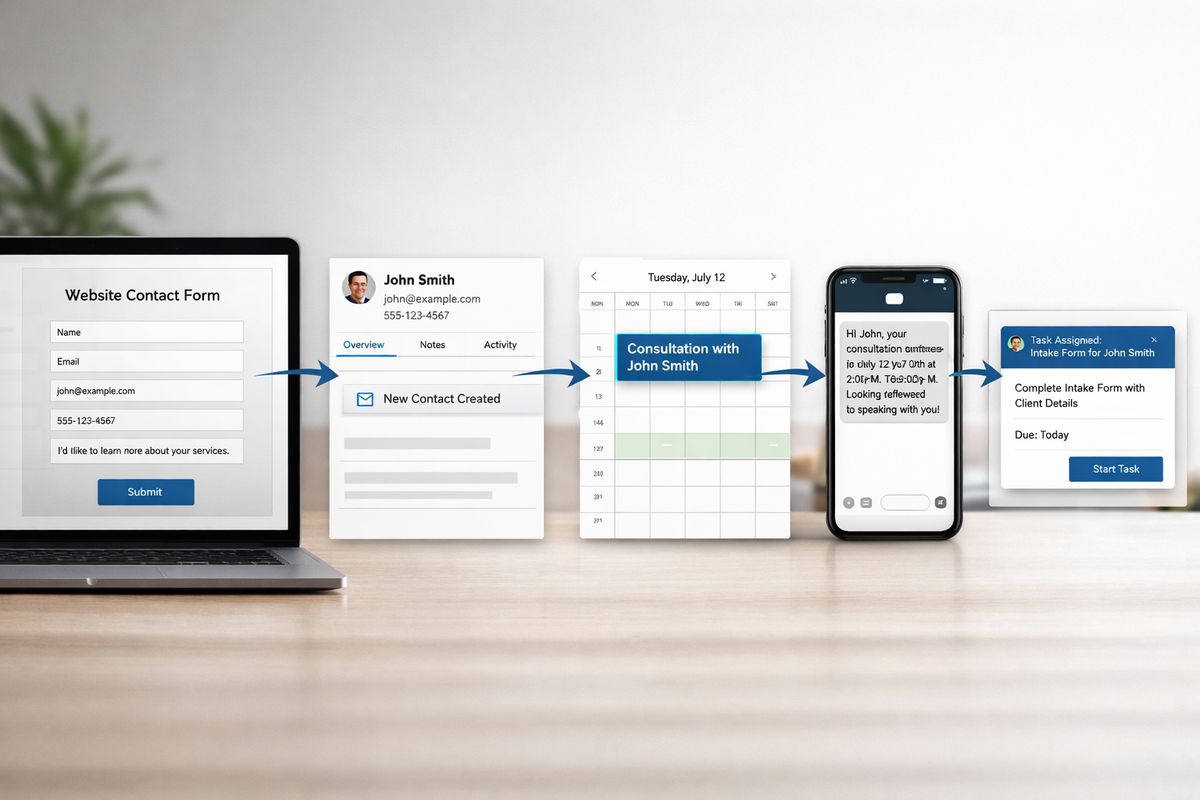
That distinction matters more than most firms realize. Having a CRM just means you bought the software. Having it integrated means a form submission can create a contact, trigger a text, notify intake, and log the source without anyone touching four separate tabs.
CRM vs. case management vs. intake software
These categories overlap, which is why the terminology gets messy fast.
A CRM usually handles the front end of the relationship: new leads, follow-up, consult scheduling, status tracking, and communication before a matter is fully opened. Case management software picks up once someone becomes a client. That is where matter workflows, deadlines, billing, documents, and ongoing legal work usually live. Intake software sits near the front door. It collects inquiry details, screens for fit, and helps qualify new contacts.
Sometimes one platform tries to do all three. Sometimes your firm uses separate tools for each. Either setup can work, but confusion starts when your team assumes “we have a CRM” means “everything is connected.” It often does not.
What “integration” actually means day to day
In practice, integration is pretty simple. Someone fills out a contact form on your site. That information lands in your CRM automatically, tagged with the source and practice area. A consultation link goes out. Your calendar updates. An intake task gets assigned. If the lead responds after hours, a reminder or acknowledgment still goes out right away.
That is the difference.
Without integration, somebody has to move the same details from one place to another, usually while phones ring, emails pile up, and Monday morning gets chaotic. That is exactly when mistakes happen.
Why Integration Matters More Than the CRM Alone
A disconnected CRM becomes another place to forget updating. That is the blunt truth.
Integration matters because it turns the CRM into a working system instead of a dusty database. When your tools sync, your intake process has momentum. When they do not, your team spends energy chasing information instead of moving leads forward.
It cuts down on double entry and missed follow-up
The first benefit is the one your staff notices immediately: less repetitive admin work. If contact details, notes, and lead sources enter once and flow where needed, your team stops doing the same task three times.
Just as important, follow-up gets harder to drop. Missed callbacks, inconsistent notes, and forgotten reminders usually come from handoffs that depend on memory. If you want a clearer view of where prospects vanish, it helps to understand how busy firms track leads from first touch to signed case. Once that process is visible, the weak spots stand out fast.
It gives your intake and marketing a clear handoff
Here’s where it gets interesting: integration does not just help intake. It helps marketing prove its value.
If your CRM is connected to forms, calls, chat, and ad sources, you can see which campaigns bring in actual consultations and signed clients, not just clicks. That changes how you spend money. You stop guessing whether a practice area page, referral partner, or paid channel is working.
This is especially useful when your firm is comparing channels like Google screen-based leads and traditional paid search or trying to understand why one campaign fills the pipeline while another just creates noise.
It improves the client experience from the first contact
Prospective clients notice friction immediately. If your office asks for the same details twice, takes too long to respond, or makes scheduling feel clunky, confidence drops before the relationship even starts.
An integrated setup creates a cleaner first impression. Replies go out faster. Scheduling feels easier. Intake forms arrive when they should. Notes stay organized. It feels less like your firm is scrambling behind the scenes, because honestly, there is less scrambling behind the scenes.
The Systems Your CRM Usually Needs to Connect With
Most law firms do not need a wildly complex tech stack. But your CRM usually needs a few solid connections to work well in real life.
Website forms, chat, and call tracking
Your website is often the first place a lead appears, so that is the first connection to get right. Contact forms, live chat, tracked phone calls, and text inquiries should feed directly into the CRM with source details attached.
Source tracking matters because marketing decisions depend on it. If you cannot tell whether leads came from organic search, paid ads, directory listings, or a chat widget, budget conversations get fuzzy. A closer look at why tracked phone calls matter for law firms makes this point pretty clear, especially for firms that get more consultations by phone than by form.
Email, calendar, and appointment scheduling
This part sounds basic, but it saves real time. Your CRM should connect with the email and calendar tools your team already uses, whether that is Outlook, Gmail, or Google Calendar, plus whatever scheduling software handles consultations.
When those tools sync properly, confirmations go out automatically, calendar conflicts drop, and no one has to manually create every appointment. It smooths out the simple stuff, which is exactly where intake often gets stuck.
Practice management, billing, and document tools
Once a lead becomes a client, the handoff matters. This is where CRM integration often fixes the gap between sales and service.
A good setup can push approved client data into practice management, trigger document generation, start billing workflows, route intake forms for e-signature, and sync files to the right place. Instead of restarting the process from scratch, your team continues it.
Marketing platforms and reporting dashboards
Your CRM can also connect to email marketing tools, analytics platforms, ad data, and reporting dashboards. That connection helps you track the full path from click to consult to signed client.
For firms using AI-assisted outreach or automated intake steps, this becomes even more useful. There is a big difference between experimenting with software and using AI in ways that actually support firm growth. Integration is what makes those tools measurable instead of gimmicky.
What Good Law Firm CRM Integration Looks Like
Good integration is not about having the most apps. It is about having fewer gaps.
One contact record, not five versions of the same person
At its best, your setup creates a single source of truth. One contact record should carry the right name, phone number, matter type, notes, and status wherever that information needs to go.
If your team has one spelling in the CRM, another in billing, and a third version in case management, reporting gets unreliable fast. Duplicate records are not just annoying. They break automations, confuse staff, and make follow-up sloppy.
Automated workflows with human review where it counts
Automation should handle repetitive steps, not judgment calls.
That means confirmation emails, reminder texts, internal assignments, follow-up sequences, and intake requests can run automatically. But conflict checks, urgency decisions, fit assessments, and anything sensitive still need human review. The trick is to automate the boring handoffs and keep people focused on the decisions that actually require experience.
If your firm is exploring follow-up systems that connect directly to intake workflows, this is the standard to use. Faster does not mean robotic. It means fewer avoidable delays.
Clear visibility into lead status and next steps
Your team should be able to open the CRM and instantly see where each lead stands: new, contacted, consultation booked, qualified, signed, declined, or inactive.
That sounds obvious, but plenty of firms still run intake from scattered inboxes, sticky notes, and memory. Clear pipeline visibility solves that. It shows what happens next, who owns the next step, and what is waiting too long.
Common Integration Problems Law Firms Run Into
Integration helps a lot, but it does not magically fix a messy process. Some problems just move faster if you do not clean them up first.
Bad data in, bad data out
If your forms collect inconsistent information, or your staff enters names and matter types six different ways, your reports and automations get unreliable. That is the plain-English version of data hygiene: keeping your information clean enough to trust.
Messy fields, duplicate contacts, and missing phone numbers do not just look bad. They cause reminders to fail, records to split, and reporting to lie.
Too many tools, weak connections
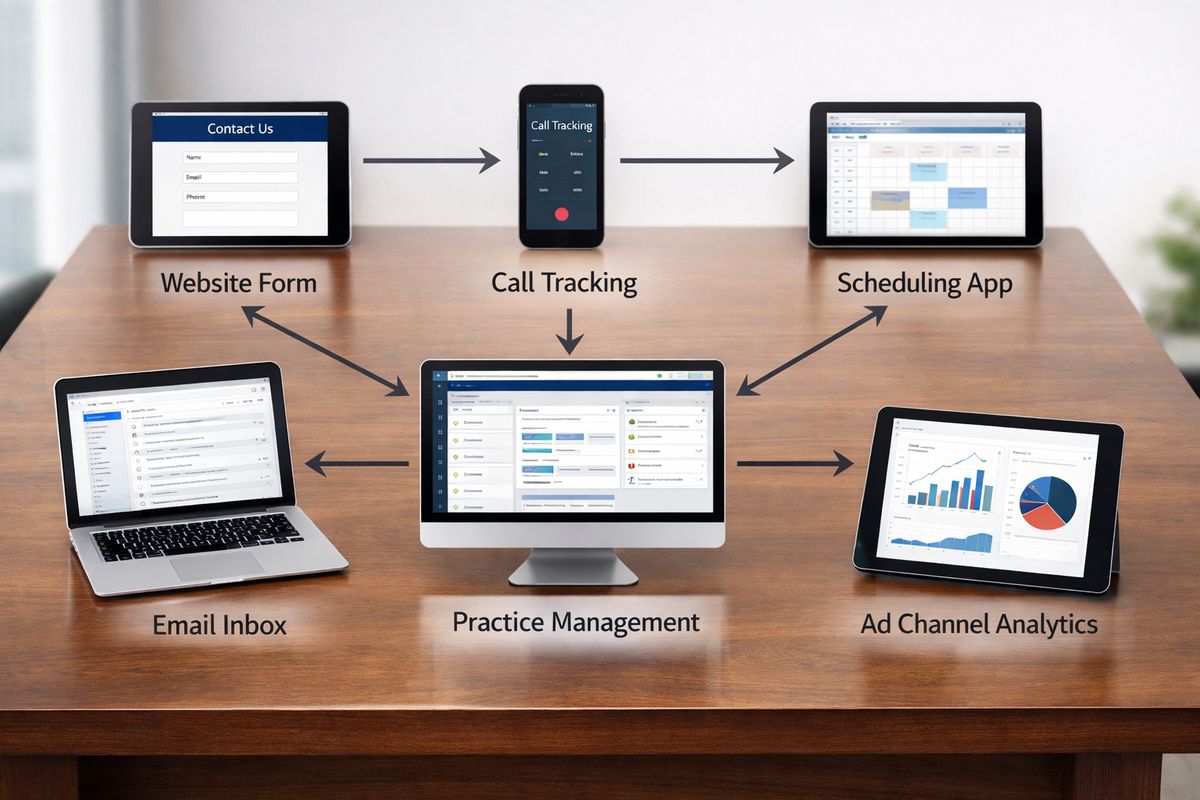
This is one of the most common stack problems in law firms. Your website uses one form tool. Chat lives somewhere else. Calls run through another vendor. Scheduling uses a separate app. Practice management sits on its own island.
On paper, each tool works. In real life, the connections between them are weak, partial, or one-way. That patchwork often creates more admin work than expected. In some cases, simplifying your vendor stack instead of adding another platform is the smarter move.
Compliance and security concerns
Client data needs protection no matter how convenient the workflow is. Permissions, storage, access controls, vendor vetting, and confidentiality expectations all still apply when systems connect.
A good integration setup respects legal ethics and internal controls. Not every staff member needs access to everything. Not every vendor should hold sensitive data. Convenience should never outrun common sense.
How to Choose the Right CRM Integration Setup for Your Firm
The best setup is not the one with the longest feature list. It is the one that fixes the point where your intake process currently breaks.
Start with your intake bottleneck
Begin with the snag, not the software category. Maybe response times are slow. Maybe your team books too few consultations. Maybe good leads come in, but nobody can tell which marketing source produced them. Maybe the handoff into case management is clunky.
Here’s the thing: if you do not name the real bottleneck first, every demo sounds impressive and nothing actually gets fixed.
Map the tools you already use
Your current stack matters more than any sales page. Look at your website platform, form tool, call tracking, calendar, email, practice management system, and ad channels. Then map how a lead currently moves between them.
This exercise usually reveals the obvious pain. A call comes in from a page built for local search visibility that depends on the right intake path, but the source gets lost before anyone reports on it. Or a consultation gets booked, but the intake form never reaches the right person. The problem is often not mysterious. It is just hidden in handoffs.
Prioritize must-have integrations and automations
Not every connection matters equally. Lead capture, appointment booking, follow-up sequences, source tracking, signed intake forms, and matter creation usually have the biggest payoff first.
Nice extras can wait. Fancy dashboards are less useful than a system that consistently replies to new leads and gets consultations on the calendar.
Look for reporting you can actually use
Good reporting should answer simple business questions. Where did this lead come from? How fast did your team respond? How many consultations were booked? Which channels turn into paying clients?
If a dashboard needs a decoder ring, it is not helping. Clear reporting should support better decisions, not create another weekly ritual no one trusts.
A Simple Example of an Integrated Law Firm CRM Workflow
Picture a personal injury lead landing on your site at 8:17 p.m. after visiting a highway crash page from a mobile phone. That timing matters, because after-hours intake is where a lot of firms quietly lose business.
From first inquiry to signed client
The person fills out a form. The CRM creates a new record immediately, tags the source, notes the page visited, and assigns the inquiry to the right intake path. A confirmation message goes out right away, along with a link to book a consultation.
Once the consultation is selected, calendar details sync automatically and a reminder text goes out before the appointment. An intake questionnaire follows. If the answers fit your practice area, a conflict check gets triggered and the right staff member reviews it. Engagement documents go out for e-signature. Once signed, the matter gets created in your case management system.
No retyping. No mystery. No “did anyone ever call this person back?”
Where firms usually lose people without integration
Without integration, that same lead can disappear in boring ways. A voicemail sits until morning. A handwritten callback note never makes it into the system. A scheduling email goes out late. Two people follow up separately. Marketing gets credit for a lead, but no one can tell if it became a client.
That is the real cost. Not just inefficiency, but broken visibility.
Questions Law Firms Often Ask About CRM Integration
Do small law firms need CRM integration?
Yes. Smaller firms often benefit the fastest because every missed lead hurts more. If your team is lean, basic automation can protect follow-up when the office gets busy.
Can your CRM connect to your existing legal software?
Often, yes. Many CRMs connect directly or through middleware. The better question is how well the data syncs, what fields map correctly, and which actions trigger the next step.
Is this mostly a marketing tool or an operations tool?
It is both. On the marketing side, it captures and tracks leads. On the operations side, it moves qualified prospects into intake, onboarding, and active client workflows with less friction.
What should you try first?
Map your intake flow from website inquiry to signed engagement and count every manual handoff. That one exercise usually shows exactly what needs fixing first.
How long does it take to see results from CRM integration?
Basic improvements can show up quickly, especially with faster response times and cleaner scheduling. Deeper reporting and smoother handoffs usually take longer, because your data and workflows need to settle into a consistent pattern.
What Changes Once You Understand This
Once you understand law firm CRM integration, you stop evaluating software like a feature contest and start looking at it like a workflow. That shift matters. The goal is not to collect more tools. The goal is to make intake easier to run, easier to measure, and easier for prospective clients to trust.
Try one thing: trace your last five leads from first contact to current status and mark every place someone had to re-enter information by hand. That simple exercise usually shows exactly where your CRM is helping, and where it is just sitting there.
If you want a clearer plan for your firm’s setup, schedule a call with Attorney Visibility ai for more information.