
Rain glossed Main Street black as ink, and the managing partner, Daniel Mercer, stood alone behind the conference room glass with a phone in his hand. He typed the same search again, law firm not showing on Google Maps, and watched rival firms bloom across the screen while his own office stayed dark. That missing pin usually traces back to a short list of causes, and each one leaves evidence.
The rain on Main Street and the missing pin
For most firms, the problem does not begin with Google “failing” to recognize the business. It begins with a broken signal. A listing is unverified, a duplicate sits at the same address, the wrong category tells Google the firm handles the wrong kind of matter, or the website and directory listings argue over the real address.
What absence looks like in practice varies. Sometimes the firm appears only when searched by exact name. Sometimes the profile exists in Google Maps but never breaks into the local pack for terms like “car accident lawyer” or “family attorney near me.” Sometimes the listing vanished after a move, a rebrand, or a suspension notice nobody noticed. The audit below separates those situations fast.

What this audit requires before the search begins
The HVAC hummed over a walnut conference table while Daniel spread out a legal pad, admin passwords, and a printout of the firm’s old citations. That is the right setup. A clean audit needs access, not guesswork.
Before any fix begins, the team needs the Google Business Profile login, website CMS access, current call tracking details, the exact office address used on signage and mail, the review profile, and a list of citation sources. If call tracking is in place, the team also needs to confirm how numbers are routed and displayed, because inconsistent phone use creates local SEO friction. Firms sorting that issue usually benefit from understanding how tracking numbers affect local visibility.
Step 1: Confirm whether the firm is truly missing or simply filtered
Morning light against downtown glass often reveals the first hard truth: the listing is not always gone. It is often buried, filtered, or visible only under branded searches.
- Search the firm name in Google Search and Google Maps.
- Search major practice areas plus city, such as “personal injury lawyer Dallas.”
- Search practice areas plus “near me” on mobile.
- Compare results in the local pack versus full Maps results.
- Record where the profile appears, where it does not, and under which phrases.
Success here looks simple: a clear separation between indexing and ranking. If the profile shows by name, Google knows the listing exists. The problem is relevance, prominence, or proximity.
Search by firm name, practice area, and city
The clicks sounded tiny in the still office as the team compared “Mercer & Hale” with “truck accident lawyer Dallas.” Those are different tests. A direct-name search checks existence. A category search checks competitiveness.
If the firm appears for its own name but disappears for practice terms, the issue sits in optimization and authority, not basic existence. If it does not appear even for the exact brand name, the team should suspect verification problems, suspension, duplication, or severe data inconsistency.
Check desktop, mobile, and the Maps app
A phone buzz on polished wood often tells a different story than a desktop browser. Mobile results rely more heavily on proximity and live location data. The Maps app also surfaces profiles differently than search results on desktop.
- Test the brand search on desktop.
- Test the same query on a mobile browser.
- Test again inside the Google Maps app.
- Note differences in the local pack, Maps rankings, and driving-distance views.
Checkpoint: if the firm appears on desktop but disappears on mobile, proximity and category alignment usually sit at the center of the problem.
Rule out personalization and location bias
Stale coffee in the break room, cached searches in the browser, and the physical location of the searcher distort reality. Clean testing matters.
Use incognito mode, log out of Google accounts, and run searches from multiple ZIP codes through trusted geo-testing tools. Searchers standing three blocks from the courthouse often see a different pack than searchers in the suburbs. That difference is normal. What matters is the visibility pattern across the metro.
Step 2: Verify that the Google Business Profile is claimed, verified, and live
A silent profile often leads back to a dashboard alert no one opened. Verification status decides whether Google trusts the listing enough to show it broadly.
- Open the Google Business Profile dashboard.
- Confirm the listing is claimed by the firm.
- Check whether verification is complete.
- Confirm the profile is published and not pending edits.
- Review any warnings, restrictions, or support notices.
Check verification status inside the profile dashboard
The dashboard usually states the problem plainly. It shows “verified,” “pending,” or a prompt to complete verification through postcard, video, phone, or email. If the listing is not verified, rankings stall. If publishing is incomplete, the profile stays weak or invisible.
Any notice about limited visibility deserves immediate action. Firms that need a broader framework for active listing oversight should study ongoing profile upkeep for growing practices.
Identify suspended, disabled, or duplicate listings
Tension rises when a second listing appears at the same suite number like a ghost. Duplicate listings split authority and confuse Google. Suspended or disabled listings disappear outright or lose ranking power fast.
Search the firm name, old brand variations, old phone numbers, and old addresses. If the office moved, the old profile may still be indexed. If multiple attorney listings point to the same practice with similar data, Google may suppress one.
Match the business setup to Google’s eligibility rules
The texture of a lease agreement matters here. So do lobby signs, suite numbers, and office photos. Google expects a real, staffed office for a storefront legal listing. Virtual offices and mail drops fail that test.
Law firms also need the correct setup. A firm listing should represent the business. Individual attorney listings should represent real public-facing practitioners. If several lawyers share one office, each profile needs distinct, policy-compliant information. Google’s own business eligibility and local visibility documentation remains the baseline reference for this process (Google Business Profile guidelines).
Step 3: Audit the firm’s name, address, phone number, and website for consistency
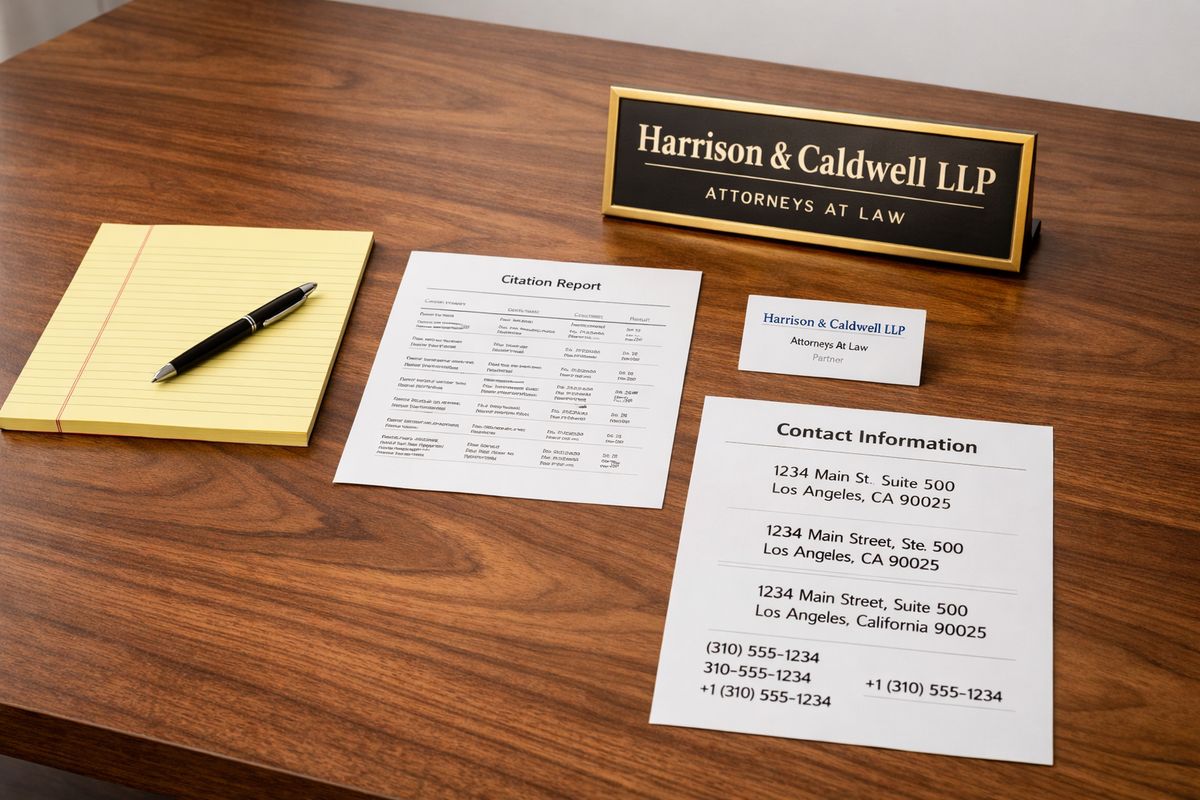
The brass plaque in the lobby said “Mercer & Hale, PLLC.” The footer on the website said “Mercer and Hale Injury Lawyers.” An old directory still showed a receptionist line from a former suite. To Google, that looks like three different businesses.
- Write down the exact firm name used in GBP.
- Confirm the exact address, including suite formatting.
- Confirm the primary phone number.
- Match those details against the website, directories, and social profiles.
- Correct every mismatch.
Standardize the firm name everywhere it appears
A law firm name should match across the web. Not close. Exact. Adding city modifiers, practice terms, or marketing slogans to the GBP name weakens trust and risks suspension. Google wants the real-world business name, the one on signage and legal documents.
Fix address formatting, suite numbers, and phone conflicts
Old numbers and half-correct addresses are common after moves, mergers, and rebrands. Standardize abbreviations, suite numbers, and the main phone line. If tracking numbers are used, the GBP should still point to the proper primary local identity. Teams that need a cleaner structure for attribution and routing benefit from seeing how firms set up call intelligence without wrecking local trust.
Align the website landing page with the GBP listing
The office location page should mirror the listing exactly. Same firm name. Same address. Same phone. Same office hours where relevant. Add an embedded map, clear contact information, and localized context. For firms with multiple offices, each office needs its own dedicated page. Stronger city-specific landing pages reinforce relevance when competition is heavy.
Step 4: Choose the right primary and secondary categories
Under flat fluorescent light, one dropdown field often explains months of invisible rankings. Category choice tells Google what the firm is, and Google takes that literally.
- Open the GBP editing panel.
- Review the current primary category.
- Compare it to the firm’s highest-value practice area.
- Add supporting secondary categories only where accurate.
- Benchmark against top-ranking competitors.
Select the strongest primary category for the main revenue line
If the firm’s biggest revenue stream is personal injury but the profile says “Law Firm,” relevance is diluted. A more specific category, such as “Personal Injury Attorney,” often performs better because it matches search intent more closely.
The primary category should track the main business line, not a vague umbrella term. Firms trying to understand those category and relevance signals at a deeper level should review the local ranking signals attorneys need most.
Add secondary categories without diluting relevance
Secondary categories support related services, but excess muddies the signal. A family law firm can add “Divorce Lawyer” where accurate. It should not stack ten loosely related categories just because competitors did.
Compare category choices against top local competitors
Search the target practice terms and inspect the firms already ranking in the local pack. Their categories leave visible clues. If every top result uses a more specific practice category, broad labeling becomes a self-inflicted handicap.
Step 5: Strengthen the listing with complete profile signals
A strong listing feels lived in. Sharp photos. Stable hours. Clear services. A description that belongs to a real place, not a template.
- Complete every available core field.
- Add business hours and holiday hours.
- Write a grounded business description.
- Add services and appointment links.
- Upload original office photos regularly.
Complete every core profile field
An incomplete profile sends the wrong message. Hours, holiday hours, services, description, website URL, appointment links, and attributes should all be filled out accurately. Google rewards clarity because clarity reduces user friction.
Upload original photos that prove the office is real
The shine of the front door at noon, the reception desk grain, the exterior sign above the suite, the waiting room chairs under warm lamp light, these details help validate existence. Stock photography does nothing for trust. Original imagery supports both users and verification signals.
Use services and practice area details strategically
Services should reflect actual matter types and practice lines in plain language. “Car accident representation” or “child custody” works. Repeating city names and keywords in every field looks manipulative and weakens quality.
Step 6: Repair the website signals that support Google Maps rankings
A Google Maps profile rarely stands alone. It leans on the website behind it, and if that scaffolding is thin, map rankings wobble.
- Review the contact page and office page.
- Confirm local content exists for target markets.
- Add schema markup for the business and attorneys.
- Improve internal linking to location and practice pages.
- Check site speed, crawlability, and mobile usability.
Optimize the contact page and office location page
The contact page should feel verifiable. It needs full NAP data, an embedded map, office photos, directions, parking notes, and links to relevant practice pages. Thin contact pages weaken the local entity.
Publish location-relevant and practice-relevant content
Courthouse proximity, neighborhood references, local accident corridors, and city-specific legal concerns all help when written with precision. Strong local search strategy for lawyers ties those signals together instead of treating the map listing like a separate asset.
Add local business and attorney schema
Structured data gives search engines machine-readable clarity. Use legal service, local business, attorney, organization, and review-related schema where appropriate. It will not rescue a broken listing by itself, but it reinforces entity understanding.
Step 7: Build citation authority across legal directories and local platforms
Directory listings sound dull until the rankings move. Then every old branch office and every wrong phone digit starts to matter.
- Audit existing citations.
- Remove duplicates and outdated locations.
- Standardize NAP across every platform.
- Prioritize legal directories and core local platforms.
- Recheck data after updates go live.
Clean up old listings, former offices, and duplicate citations
Firms that moved often leave a dusty trail: old suites on Yelp, stale listings on Avvo, abandoned branch offices on Apple Maps. Those remnants split authority. Cleanup should start with every former address, old phone line, and alternate brand variation.
Prioritize authoritative legal and local directories
Avvo, Justia, FindLaw, Yelp, Apple Maps, Bing Places, and major data sources matter far more than obscure citation farms. Google weighs both consistency and the credibility of the sources repeating that information.
Maintain exact consistency across every citation source
One wrong suite number repeated across ten directories becomes a pattern. Citation management should be systematic, documented, and revisited after any move or rebrand.
Step 8: Generate review velocity and reputation signals that move rankings
At 8:13 a.m., a fresh five-star review can land with force in a thin market. Three months of silence can do the opposite. Reviews affect both click behavior and local prominence.
- Build a repeatable review request process.
- Ask at the right point in the client lifecycle.
- Respond to every review professionally.
- Monitor recency and rating trends.
- Address review droughts quickly.
Build a compliant system for review acquisition
Review collection should be disciplined and ethical. Intake closeout emails, post-matter follow-ups, and staff prompts all work when they are consistent. No gating. No incentives. Just a steady request process tied to real client outcomes.
Respond to every review with professionalism and location relevance
Responses show activity. They also show professionalism. A concise, confidentiality-safe response that acknowledges the experience and references the office naturally signals active management without oversharing.
Address weak ratings and review droughts before they suppress trust
A profile with twelve old reviews and nothing new for nine months looks stale beside a competitor adding fresh feedback weekly. Ranking pressure rises in markets where review volume and recency are strong.
Step 9: Diagnose proximity, competition, and local pack filtering
Even a clean profile can disappear when distance, saturation, or filtering takes over. This is where many firms misread the problem. The listing is not broken. The market is brutal.
- Map rankings across the metro area.
- Compare visibility by ZIP code and distance from office.
- Check for shared-address filtering.
- Benchmark stronger competitors.
- Set realistic visibility expectations by geography.
Measure how distance affects visibility across the metro area
From courthouse blocks to outer-ring suburbs, rankings shift street by street. Grid tracking reveals where the firm is strong and where proximity shuts the door. That visibility map matters more than a single search from one desk.
Recognize local pack filtering in shared buildings and suites
In executive suites and high-rise offices, Google often shows one similar firm and suppresses the others. Shared categories, same building, similar names, and overlapping signals trigger filtering. That pattern is common in legal markets packed into downtown towers.
Benchmark against stronger competitors in the same practice area
Study the profiles that rank. Compare review counts, category specificity, office location strength, citation consistency, localized content, and the authority of the website. Firms also need to compare map visibility with adjacent channels like screened legal placements in Google’s service ads, because competitors often dominate more than one local surface at once.
Step 10: Escalate serious issues and create a recovery plan
When every correction is in place and the listing still stays buried, the process turns procedural. Screenshots replace assumptions. Documentation replaces frustration.
- Gather all relevant evidence.
- Identify the exact issue type, suspension, duplicate, edit failure, or filtering.
- Submit the correct support or reinstatement request.
- Track every case number and response.
- Escalate to specialists if rankings do not return.
Gather evidence before contacting Google support
Collect screenshots of missing results, dashboard warnings, verification notices, business licenses, utility bills, signage photos, lease documents, and citation records. The stronger the record, the faster the case moves.
Submit reinstatement, edit, or duplicate-resolution requests
Each support path serves a different problem. Suspensions require reinstatement. Wrong public data needs edits. Duplicate conflicts need merge or removal requests. Precision matters because the wrong form burns time.
Hand off complex recoveries to a legal SEO agency
When the firm moved offices, lost rankings after verification, shares a building with several attorneys, or suffered a suspension tied to policy issues, specialist intervention becomes the fastest route back. Firms weighing outside support should look closely at what separates a dependable legal marketing partner from a generic vendor.
Common issues that keep law firms off Google Maps
A copier whirred down the hall while the same failures surfaced again and again. Most disappearances come back to a familiar pattern.
The profile is verified but still not ranking
That usually means weak prominence, poor category relevance, thin reviews, weak citations, or poor local website signals. Verification gets the listing into the system. It does not win the pack.
The firm changed offices and vanished after the move
Address changes often trigger a collapse in trust if old citations, old maps pins, and old suite references remain live. Post-move cleanup needs to happen everywhere, not just inside GBP.
Multiple attorneys share one location and only one appears
That points to filtering. Similar practitioner listings at the same address, especially in shared offices, often cannibalize each other. Distinct profiles, stronger individual entity signals, and cleaner differentiation help.
The listing appears in Maps but not in the local pack
That means the profile is indexed but not competitive. The issue is ranking strength, not existence.
What success looks like after the fixes take hold
The change rarely arrives as one dramatic spike. It shows up as steadier signs. Branded searches return a clean profile. Practice-area searches start surfacing the firm in more ZIP codes. Calls from map-driven prospects rise. Direction requests climb. Review activity looks alive again.
Recovery timelines vary by the damage. Verification fixes can resolve quickly. Category, review, citation, and website repairs take longer because Google needs time to trust the new pattern. But once the signals align, the profile stops flickering and starts holding ground.
The next move for firms that want the map pack back
Streetlight still reflected on wet pavement outside Daniel Mercer’s office when he ran the search again, but the screen looked different now. The pin held. The listing lived where prospects were actually looking. Firms that want that outcome to last need more than a one-time fix. They need disciplined local SEO, active profile management, review growth, and clean lead attribution. Schedule a call with Attorney Visibility ai for more information.
Frequently Asked Questions
Why is a law firm showing on Google Search but not in Google Maps?
That usually means the website is indexed, but the Google Business Profile is weak, unverified, suspended, duplicated, or not competitive enough to rank in Maps results.
How long does it take for a law firm to reappear on Google Maps after fixes?
Verification or duplicate cleanup can move quickly. Ranking recovery from category changes, citation repairs, review growth, and website improvements takes several weeks to several months because Google needs to process and trust the updated signals.
Can a virtual office keep a law firm off Google Maps?
Yes. Google requires a real, staffed location for a storefront-style legal listing. Virtual offices, mail drops, and shared spaces without compliant signage or presence often trigger suspension or invisibility.
Do reviews really affect Google Maps rankings for lawyers?
Yes. Review quantity, recency, quality, and response activity all influence local prominence and click behavior, especially in competitive practice areas.
Why does only one attorney appear from a shared office suite?
Google filters similar businesses in the same building when categories, names, and signals overlap too heavily. That is common in executive suites and multi-firm downtown towers.
Should a law firm hire an agency if the listing is still missing after basic fixes?
Yes, especially after a suspension, office move, duplicate conflict, or severe ranking drop. Complex recoveries move faster when handled by a team that specializes in legal local SEO and Google Business Profile issues.